

A late-stage back-office application needed billing, reporting, and operations logic to come together.
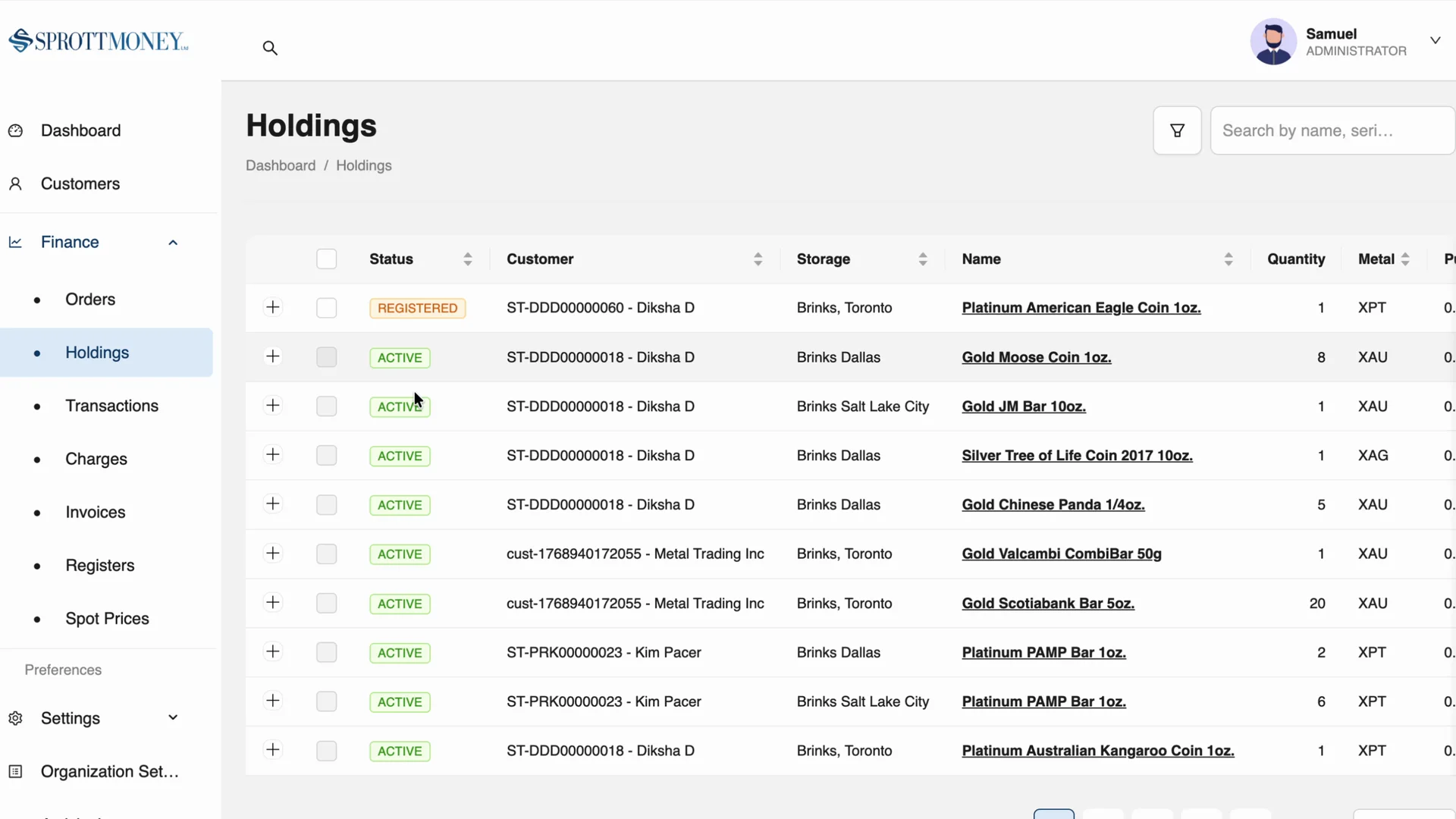
An approved demo-data capture of the back-office product surface. The engineering story remains about calculations, reports, recoverable order workflows, and operational data management.
The short version
Back-office applications are often described as dashboards, but the difficult parts usually live below the tables. The work gets serious when the system has to calculate charges, apply tax rules, generate invoices and statements, update related records, and keep enough correlation between those records that the business can trust what it is seeing.
I was brought in by a delivery partner as overflow engineering support on a precious-metals back-office web application that was moving through late-stage completion work. The engagement ran across a 12-month window with intermittent involvement. My job was to help take the system across the finish line without turning the existing delivery path into a reset.
Core lesson
Internal tools become product work when operational correctness matters more than surface area.
What prompted this
The end client was a precious-metals business with public customer surfaces around metals, storage, account activity, and market resources. The application I worked on was not the public storefront. It was a back-office system used to manage operational data behind that kind of business context.
The delivery partner was my direct client on the engagement. I joined under their banner as overflow support for an existing delivery path, which meant the useful role was not to reset the project or turn it into a new methodology exercise. It was to understand the system, close gaps, make practical implementation decisions, and help the team get to a shippable state.
The surface area was familiar for an internal dashboard: holdings, metals, customers, orders, and management views. The implementation risk was less familiar, because one business action could require several durable records to change together in a way another workflow could trust later.
What the work had to bring together
The dashboard was only one part of the job. The operational behaviors had to line up behind it.
Operational records
Billing logic
Order workflow
Reporting
Operational walkthrough
An approved demo-data walkthrough of operational records, invoice-draft generation, and a live generated-document preview. It does not demonstrate the private multi-record persistence workflow behind an order.
Where the real complexity lived
The billing and order systems were the hardest part of the work because they turned the application from a set of screens into an operational system.
Charge calculation sounds small until the rules have to sit beside tax handling, invoice generation, customer-specific context, and the records that those calculations depend on. Order handling sounds ordinary until a single action needs to update multiple tables, preserve correlation, and leave the system in a state that another workflow can trust later.
The pressure points
These were the areas where implementation judgment mattered more than adding another management screen.
Billing logic needed to be explicit enough that charges, taxes, invoices, and statements could be reasoned about as a system. For internal tools, a visually tidy billing page is not enough if the numbers behind it are difficult to inspect, reproduce, or explain.
Orders were a recoverable multi-record workflow
A deposit order was not simply an order row moving to a new status. It could create a correlated Transaction record and Holding record. Later order events that changed the movement or quantity of a metal could require further related Transaction and Holding records to preserve the operational story.
That made the workflow a reliability concern as much as a data-model concern. Each execution needed to be safe to retry without duplicating its effect, leave an auditable trail, and provide a recovery path if work was interrupted partway through. The public lesson is not the private business rules or schema. It is that these safeguards belong in the workflow design before the application can be trusted as an operational system.
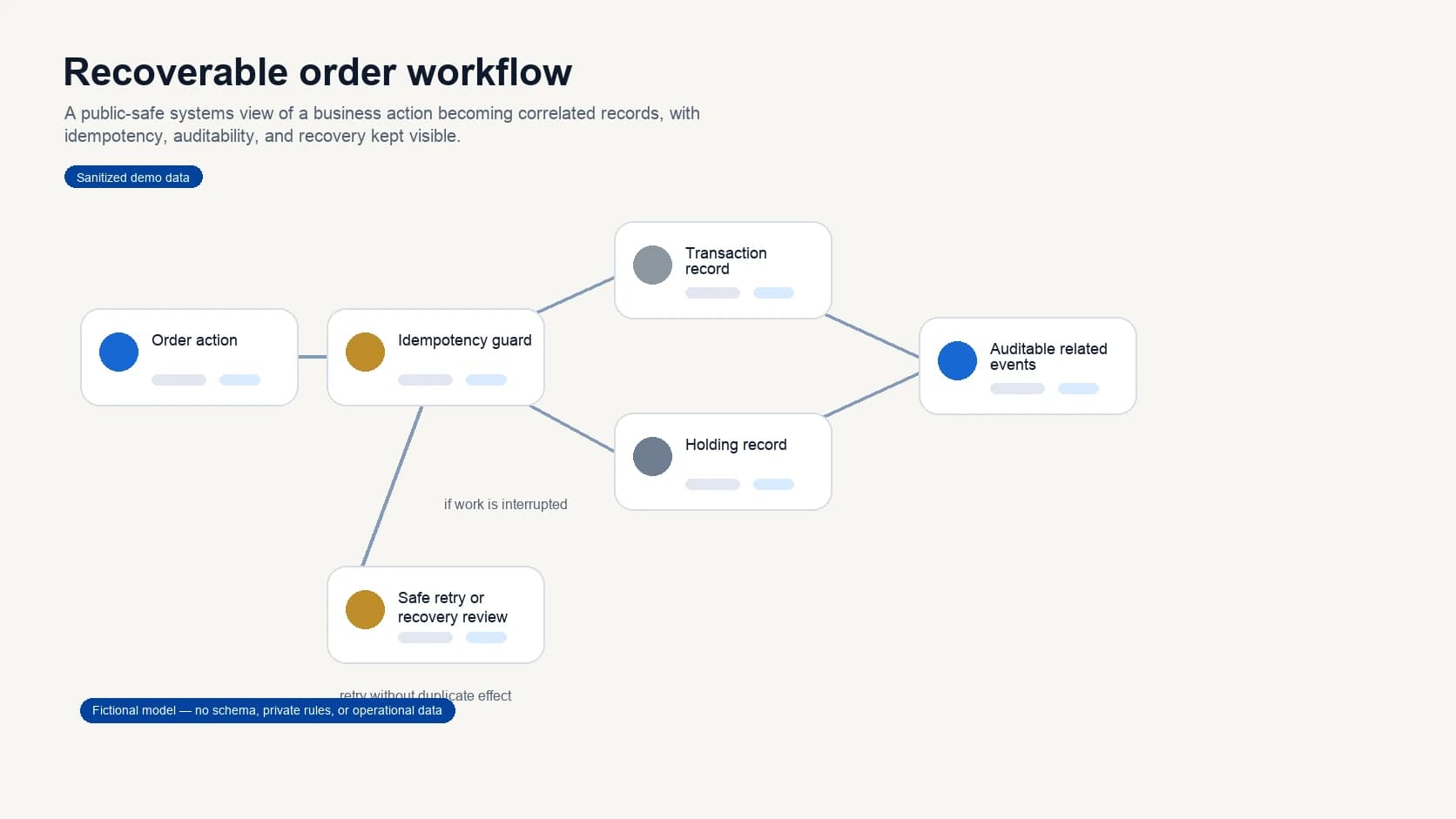
Order workflow and recovery model
A public-safe model of a business action becoming correlated Transaction and Holding records, with idempotency, auditability, and a safe recovery path kept visible.
Turning report designs into generated documents
One of the most interesting parts of the project was report generation.
The reports started from high-fidelity document designs, then had to become generated outputs. We used a React-based document-generation approach because it fit the stack and kept report layout work close to the application code. That sounds like a narrow implementation detail, but it changed how the work had to be approached. A report is not a normal responsive web page. It has page boundaries, repeatable sections, data-driven layouts, and formatting constraints that users often interpret as part of the system's credibility.
The useful pattern was to treat the designs as a document specification, not as screenshots to imitate. The implementation needed to protect hierarchy, spacing, labels, totals, and the shape of the generated output while still being flexible enough to handle real business data.
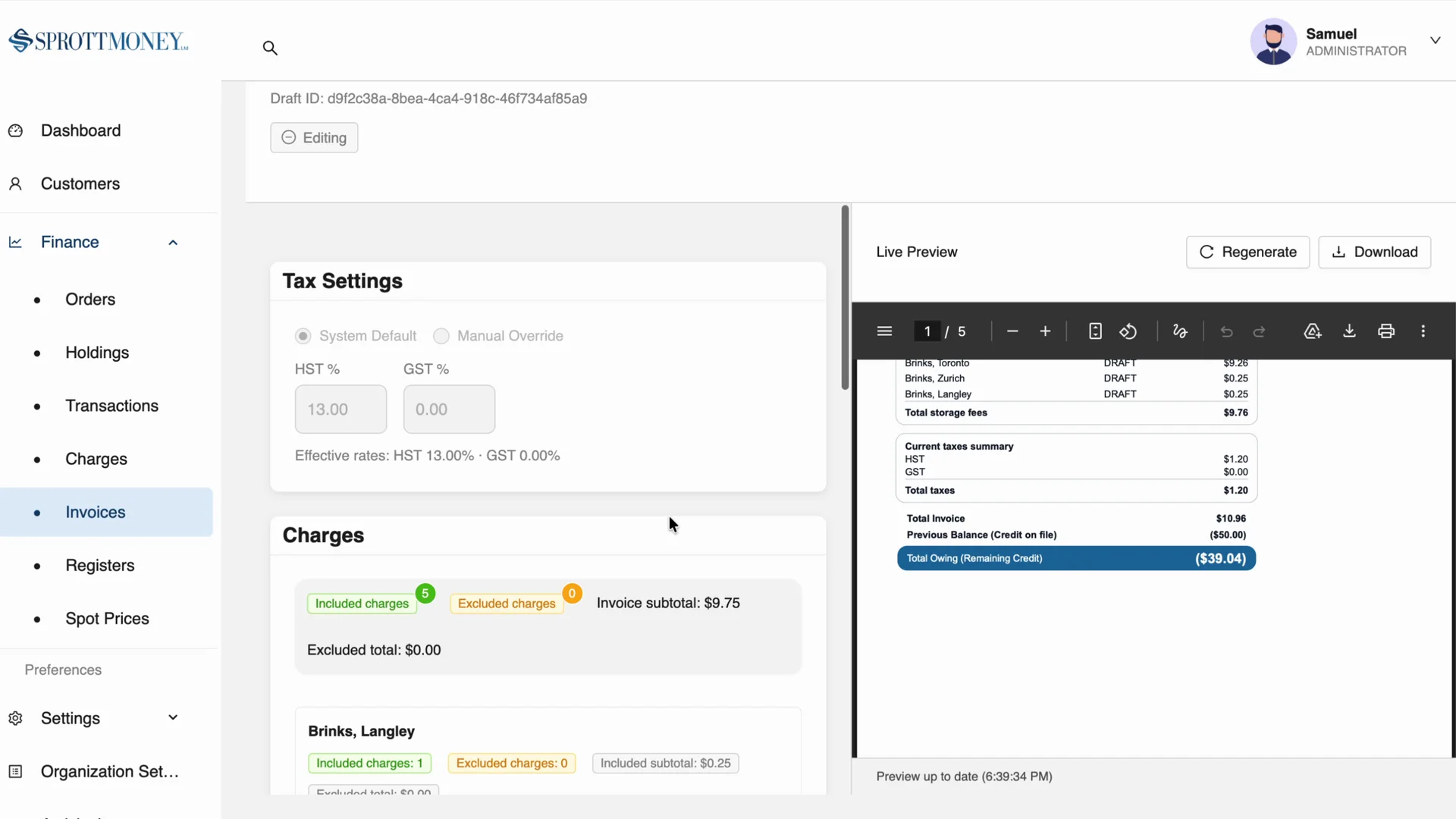
Generated document proof
An approved demo-data capture of the invoice draft editor and live document preview, showing the generated-document surface in the product itself.
Report generation becomes easier to maintain when the report is treated as a product surface with its own layout constraints, data contract, and review path. It should not be the last ad hoc export bolted onto a dashboard.
What changed
The biggest change was that the application moved from a late-stage build toward a finished operational system.
That did not happen because one screen became more polished. It happened because the implementation work connected the parts that made the system useful: data management, recoverable order workflows, billing calculations, taxes, invoices, statements, and reports.
This is the part of internal tools that is easy to underestimate. The value is not only that a user can view and edit records. The value is that the system gives the business a dependable place to run repeatable workflows without recreating logic manually outside the application.
What finish-line engineering protected
The work was less about adding surface area and more about making existing surface area trustworthy.
Clearer operations
Billing confidence
Document output
Delivery momentum
What this says about embedded engineering
This is the kind of engagement where direct senior engineering support is useful because the work is not only about throughput. The project needed someone who could enter an existing delivery path, understand the constraints, and close practical gaps without turning the engagement into a reset.
For teams building internal systems, the risk is often hidden in the phrase "admin dashboard." It can make the work sound simple, even when the product needs billing correctness, reports, auditability, and recoverable multi-record workflows.
Service fit
The useful role was to join the project where it was, make the next implementation decisions clearer, and help carry complex back-office work into a shippable state.
Stack note
React, Next.js, TypeScript, and Azure were a practical fit for this kind of internal web application because the system needed a strong interface layer and a backend shape that could support operational workflows.
A React-based document-generation layer is worth keeping in the toolkit for report-heavy internal products. It is not the right answer for every export, but when the report itself is a first-class product surface, keeping layout, data, and implementation close enough to maintain can protect the quality of the output.
Takeaway
The hard part of a back-office application is rarely the fact that it has tables. It is the business logic those tables expose.
If a system handles billing, tax calculation, report generation, order effects, and operational records, it deserves product-level implementation care. That is the difference between a dashboard that displays data and an internal tool the business can actually rely on.